Pretty good so far! If I were to make improvements, I'd add terrain on all objects with rocky surfases and perhaps find high quality textures for the planets.
For the terrain, use the brush tool (autoglue off), adjust the slider, hold left mouse to draw, fill the geometry up using the same tool, use the erase tool if you want to add more detail and use the cut tool to separate layers (like glaciers) and glue it to the planet (using glue to ____, not fixjoint).
I think it's mainly because of the weight distribution of the astronaut. Perhaps a symetrical object (e.g. cube) would work, or a mechanized leg system.
From what I'm seeing, its nice to see you're already improving enough!
My only suggestions is to modify the break limit on the axles depending on the strength of a part or reduce the amount of axles; the car is too slow and strong to even suffer a scratch! I'd recommend to add variety with the color sliders; I could barely see the car's shape with the sky's color close in similarity in relation to the body color. I'd also recommend decreasing the border size by a bit too.
If you want to be more daring with your crashable vehicle scenes, try adding interiors, driver ragdolls, airbags, etc. Good luck with your scenemaking!
Well, obviously the size AND the files would be a massive concern, but what about making it into a large hunk of binary code? Or maybe a set of hexadecimal color codes?
Either way, I don't think all three options would be possible without my potato crashing and bursting into flames ¯\_(ツ)_/¯
Looks alright, but suspension definitely needs some work
Spring constant refers to the amount of force a spring can excert. Damping is the "stiffness" of the spring. Target length is, well, the desired length of the spring. Try playing around with these sliders to get the desired suspension attributes. Don't make the spring too bouncy, but not too stiff either.
For the map, select an object, hold shift, and scroll the middle mouse to "layer" the objects visually. It makes the scene look more appealing.
Other than that, the rest seems sufficient enough. I'll return if I find more flaws in your scenes.
Overall, the design is great; you added some small details that are often overlooked and even added depth to some parts which I don't see often in many rocket scenes. However, there are things that are needed to improve the accuracy and look of the scene:
1. Please put the controls at least somewhere in the scene or in the screen description so people wouldnt have to look at the thrusters to determine the controls.
2. The real rocket is around 98 meters (or ~322ft) in height when it comes to real life, and your rocket is sized at ~31.5 meters (or ~104ft). I can excuse this if you don't want to resize or build one that big.
3. The scene looks lackluster; just the classic default template with your rocket in the center. Add something to make it more lively; a launchpad, a VAB, whatever fits the scene's main object.
Now, the suggestions and reccomendations:
1. There should be seperate controls for the launch escape system for a scenario where the rocket's launch doesn't exactly go as planned. Could be as easy as giving the launch escape system use a different key to operate.
2. The capsule should have small thrusters too, alongside a parachute (although the latter can be excused since making parachutes are usually complex); otherwise the reentry would be uncontrollable and lead to the capsule landing with a velocity too fast.
3. Coding can make scenes hundreds of times better. Although you'd initially struggle with it, once you get the hang of it, you can upgrade your rocket and background designs with much more possibilities open.
I know you can rate scenes but since I'm using the app and not the website (and because I'm lazy), I'm giving this a 7/10: great design, but mechanics and background needs to be worked on.
Hate to break it to you, but that's not how it works.
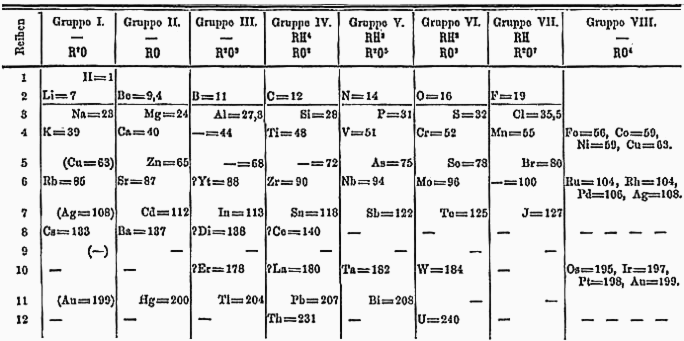
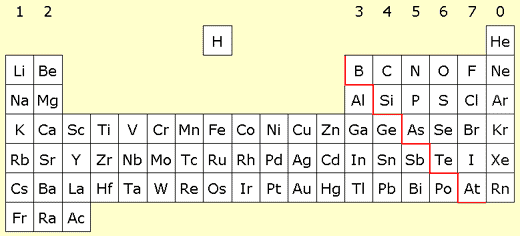
There was no such thing as a "periodic table" before the 19th century, and even by then, there wasn't a way to categorize elements by the beginning of the century. We had J.W. Dobereiner's Law of Triads in the 1820s and John Newlands' Law of Octaves. It wasn't until Dmitri Mendeleev and Lothar Meyer made the first periodic table by 1870, but even by then both Mendeleev's and Meyer's creations looked unfamiliar to the contemporary periodic table and contained many gaps representing missing elements. It wasn't until 1913 when Henry Moseley categorized the elements by atomic numbers that we get the familiar categorization of the periodic table we have today, with future models expanding on Moseley's concept.
I hope you (and anyone else reading this comment) got a quick (and simplified) history lesson of the periodic table. For more information, see this page here (amongst multiple you can easily search up).
Bit of a nitpick, but you may need to listen more to your English classes. While I can still comprehend it, your grammar has a lot of errors in pronouns, plurals, and punctuation (as an example, instead of "Here's the image of i playing this scene," a grammatically correct version of this sentence would be "Here are some images of me playing this scene.") Otherwise, the quality of the scene is decent.
To answer one of your questions, it's called a mace, though judging by the ball connected to a handle by a chain, its called a flail.
You'd want to set the collision layers of the wheels to another layer. The car, including the wheels, are set at collision layer A, and the wheels glitch as they try to "escape" the rest of the car. By setting the wheels or the body to collision layer B, this effect will not happen.