Browse Search Popular Register Upload Rules User list Login:
Search:
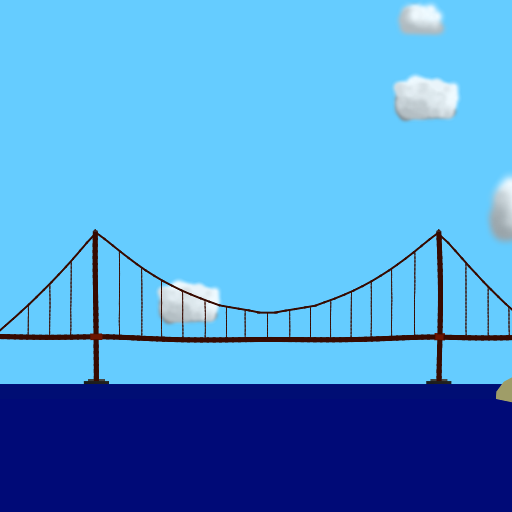
Golden Gate Bridge 3.1

Image:
screenshot of the scene

Author: Imakemarblerace

Group: Default

Filesize: 225.3 kB

Date added: 2023-01-01

Rating: 5

Downloads: 8132

Views: 623

Comments: 4

Ratings: 1

Times favored: 0

Made with: Algodoo before v1.8.5

Tags:

Scene tag

Version 3.1 of my Golden Gate Bridge designs.
The ropes are fixed now.
Enjoy:D
(dont loosen the parts at the side of the 2 towers, all hell will break loose, literally.)
Please log in to rate this scene
edit
Similar scenes
Title: Golden Gate Bridge V2.0
Rating: 5
Filesize: 261.81 kB
Downloads: 13898
Comments: 2
Ratings: 1
Date added: 2023/01/02 23:47:52
Made with: Algodoo v2.1.0
Rating: rated 5
download
Title: (SUPER) Deadly Chain Reaction 2 - (Golden Gate Bridge Collapse)
Rating: 5
Filesize: 4.14 MB
Downloads: 398
Comments: 3
Ratings: 1
Date added: 2025/12/08 18:19:06
Made with: Algodoo v2.1.0
Rating: rated 5
download
Title: Golden Gate Bridge
Rating: 5
Filesize: 101.61 kB
Downloads: 3211
Comments: 1
Ratings: 1
Date added: 2022/03/22 00:37:51
Made with: Algodoo before v1.8.5
Rating: rated 5
download
Title: Golden Gate Bridge
Rating: 5
Filesize: 199.43 kB
Downloads: 6680
Comments: 1
Ratings: 1
Date added: 2023/01/05 02:26:04
Made with: Algodoo v2.1.0
Rating: rated 5
download
Title: breakable golden gate bridge
Rating: 5.8182
Filesize: 195.53 kB
Downloads: 4340
Comments: 14
Ratings: 5
Date added: 2009/07/24 19:34:14
Made with: Phun
Rating: rated 5.8
download
Title: golden gate bridge
Rating: 5
Filesize: 293.66 kB
Downloads: 1858
Comments: 0
Ratings: 1
Date added: 2018/12/16 04:20:51
Made with: Algodoo v2.1.0
Rating: rated 5
download
Can you make the bridge drivable for cars (crashable or not) via changing collision layers? Collision layering plays an essential role on making decent scenes. I'd recommend unchecking the "Draw borders" box to remove these ugly borders in necessary objects. I would also recommend to not use the "basic colors" on the top left corner and mess around with the HSVA bars untill you found the colors you think fits the best on the scene. You should add more details to the bridge in general, too.
I would recommend using "glue together" or "glue to background" instead of fixjoints to make the scene overall more appealing.
I’m actually releasing a version 3.2. I’m considering those.
sadly i’m on mobile and i can’t copy the colors